Swept Path Vehicle Tracking, online: turning paths for trucks, buses and articulated vehicles
Draw a route over an IFC model and see the swept path of a truck, bus, fire appliance or articulated lorry, with axle-by-axle steering, trailers and a clearance check.
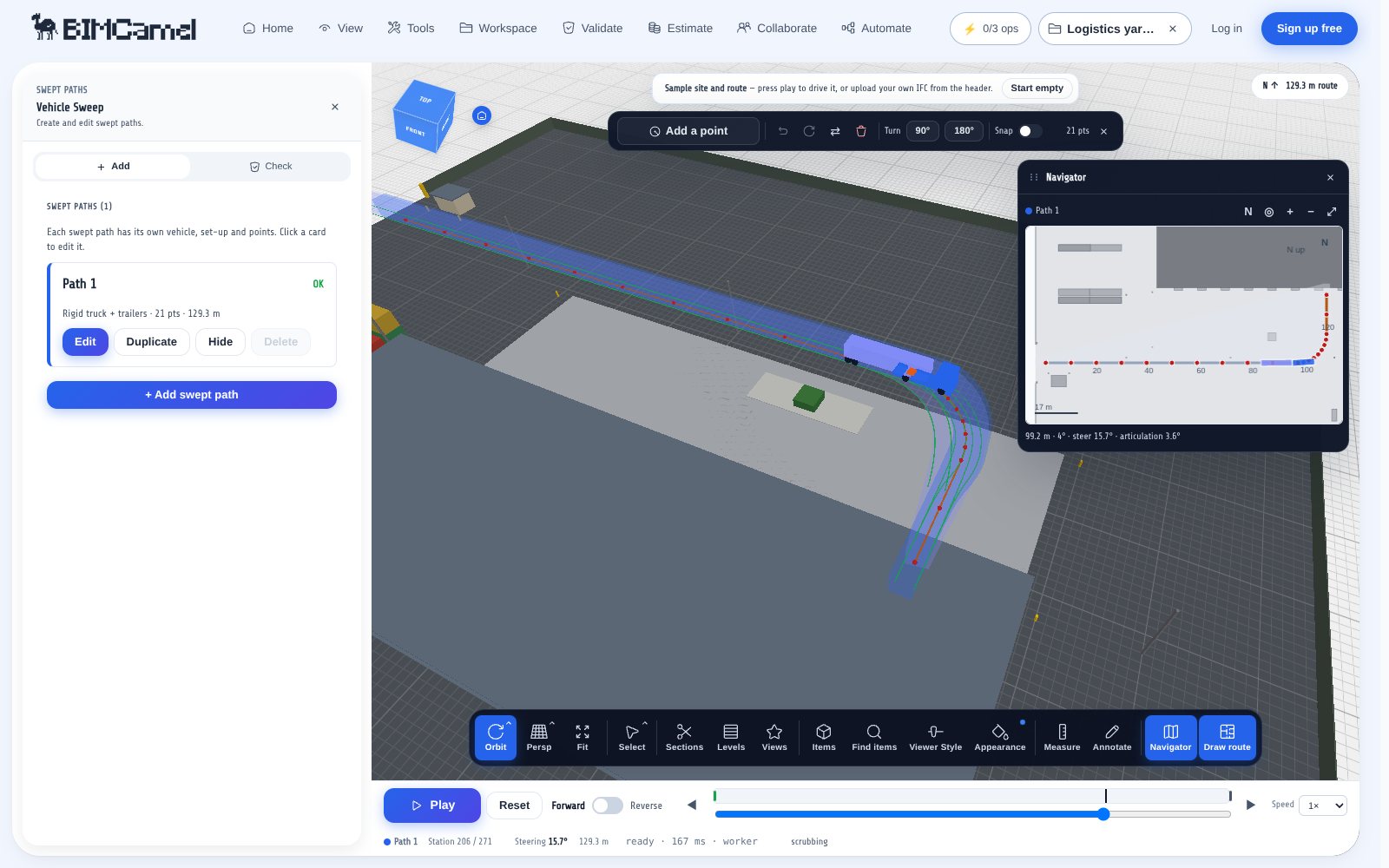
A swept path is the ground a vehicle covers as it drives a route: the outline of the body, every corner and every trailer, added up along the way. It answers the access questions of a design review. Can the refuse truck turn into the bin store? Does the fire appliance reach the far side of the building? Will a 19 m semi-trailer clear the gatehouse? This tool draws that envelope for you in the browser, on your IFC model, with nothing to install.
Open it with no model loaded and a sample site and a sample route are already there, so you can see a vehicle drive a turn before you set anything up. Then pick a vehicle, draw your own route, and read off where it needs the space. It is an early-stage check for access, turning and loading areas, not a replacement for a dynamic simulation or a certified tracking package.
When to reach for it: When you need to know whether a lorry, bus, fire appliance or articulated combination can reach, turn and leave a site or a building, and where it needs the space. Use it for early-stage access and loading-bay checks. It is a low-speed geometric check, not a dynamics simulation.
What you get: The swept envelope of every unit in the vehicle along the route, as 3D geometry in the viewer, with a DXF plan, a print sheet, a station CSV and a JSON run report. Clearance against the model is a sampled preview.
Example: Check that a 19 m semi-trailer can turn into a loading yard without hitting the gatehouse.
What swept path analysis answers
Roads and yards are laid out for the vehicles that will use them. A rigid truck needs a wider corner than a car, and an articulated lorry cuts the corner in a way that depends on its wheelbase, its trailer length and where the trailer is hitched. The only way to know is to drive the vehicle along the route and look at what it covers.
That is what the envelope shows. A route that looks generous in plan can fail at the tail swing of a long rigid vehicle, or at the corner where the trailer is pulled in. Seeing it early lets the designer move a kerb, widen a junction or shorten a vehicle before it is built.
Axles drive the simulation, not just the drawing
Each axle has a role: fixed, steered at the front, or steered at the rear. The vehicle follows the route through the point that cannot slide sideways, which is the centre of the fixed axles. A tandem or tridem is treated as one equivalent axle, so adding an axle changes the effective wheelbase and the tail swing, as it does on a real vehicle.
A trailer with no steered axle uses its hitch as its front. A lifted axle is not a pivot, and a self-steering trailer axle turns with the articulation. Coordinated rear steer, crab steering and skid-steer machines are available as steering types, and the wizard shows the turning circle at full lock so you can compare it with a published design vehicle.
Trailers, dollies and combinations
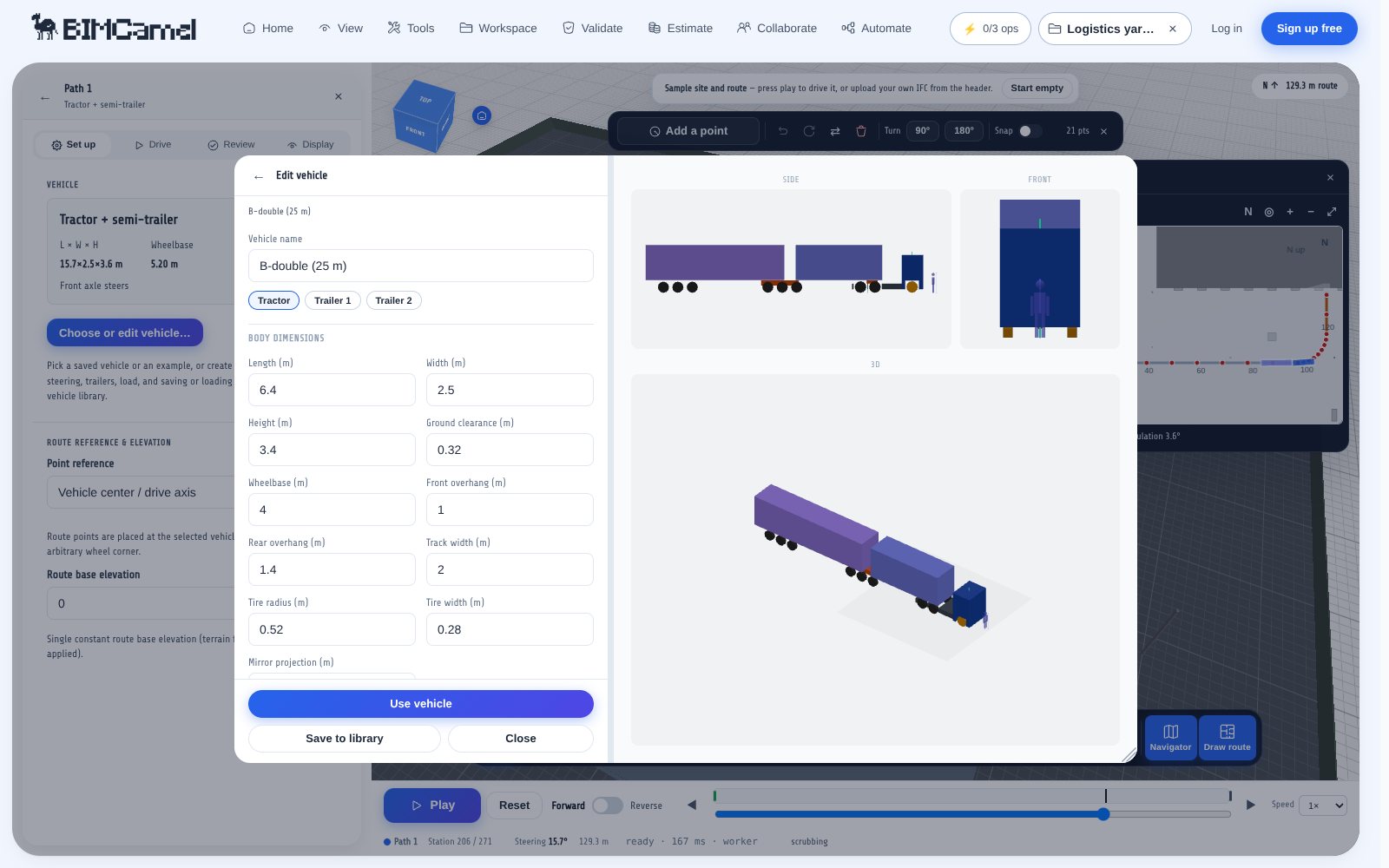
Build a combination unit by unit: a tractor and semi-trailer, a rigid truck with a drawbar trailer, a B-double joined by a B-link, an A-double or triple with dollies. Each coupling is drawn as hardware in the 3D model, in orange, so the joint is visible and not mistaken for part of the body.
Every joint has an articulation limit, narrowed to the angle at which the unit behind would meet the unit in front, so two bodies never pass through each other in a turn. Where the route asks for more than the joint allows, the station is flagged. Each joint also reports its king-pin front swing, which you can check against the 2.04 m limit that applies to articulated vehicles in the EU.
A library of design vehicles
The library starts from published design vehicles: the AASHTO Green Book passenger car, single-unit trucks, intercity bus and the WB-series combinations, using the dimensions and turning radii in NCHRP Report 1061, and the Austroads combinations in AP-G34-13 from the 19 m semi-trailer to the B-double, A-double and triples. There are also representative fire appliances, a refuse collection vehicle, a concrete mixer, a coach, an articulated bus, a mobile crane and a forklift. The vehicles marked representative are typical values, not a single published standard.
Any vehicle can be edited and saved to your own library, exported as a file and shared. A saved vehicle keeps every setting: axles, steering, couplings, deck height and loads.
- Rigid trucks, buses and coaches, with front, rear or coordinated steering
- Semi-trailers, drawbar trailers, B-doubles, A-doubles and triples
- Fire appliances, refuse vehicles, mixers and cranes
- A carried load on any unit, for long loads and overhangs
Drive it, or draw it
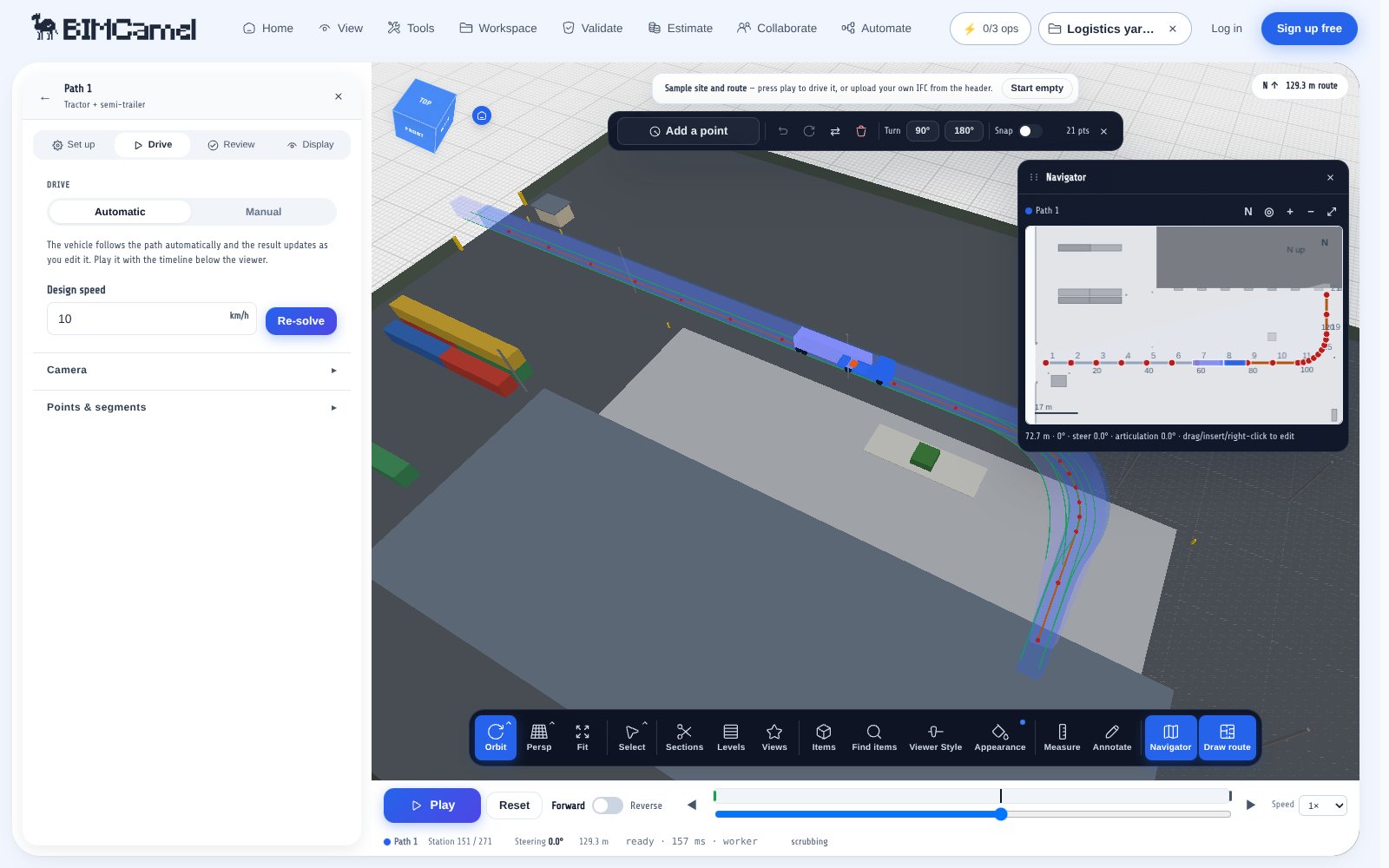
Draw the route as points on the model and the vehicle follows it automatically. Choose which point of the vehicle follows the line: the rear axle, the centre or the front axle. Or switch to manual and drive the vehicle yourself with the keyboard or a gamepad, record the pose track and turn it into a route. Several routes can sit in one project, each with its own vehicle, so you can test a car and a truck on the same layout.
A steering limit, a steering rate and a manoeuvre speed can be set. If the route needs more lock than the vehicle has, the vehicle runs wide of the line, as a real one would, and the station is reported so you know the route is not achievable.
Envelope, clearance and exports
The envelope is the union of the vehicle outline at every step, with mirrors on their own band and a load as a separate component. It is drawn as 3D geometry in the viewer, so you can orbit it, section it and see it against walls, kerbs and columns.
A clearance check samples the model along the route and lists the elements the vehicle meets. In the browser this is a sampled preview of the loaded geometry and not an authoritative clash result, so treat a clear result as a good sign and confirm the critical spots in your design tool. Results export as a DXF plan, a print sheet, a station CSV, an HTML audit report and a JSON run file.
- DXF plan of the envelope and route, in metres
- Print sheet for a drawing issue
- Station CSV with the pose at every step
- HTML audit report and JSON run file
What it does not do
The model is a low-speed geometric one: the vehicle follows the path without slip. It does not simulate dynamics, tyre scrub, load transfer or off-tracking at speed, and the trailer follows by a first-order tractrix. It is for the early stage, where the question is whether a vehicle can use the space, not for final design of a junction that must be certified.
How swept path vehicle tracking for ifc works
- Open Swept Path Vehicle Tracking from the tools list. A sample site and a sample route load so you can see it working straight away
- Choose a vehicle from the library or build your own: set the axles, the steering, the trailers and the couplings
- Draw the route over your model, or load your IFC from the header and draw on it. Press play to drive it, or switch to manual and steer it yourself
- Read the swept envelope, the steering and articulation limits, and run the clearance check. Export a DXF plan, a print sheet or the run report
Under the hood
BIMCamel parses IFC files in the browser using the open-source web-ifc engine and renders models with @thatopen/components + three.js. Heavy operations (clean / optimise / validate / convert) run on disposable server-side workers using the same web-ifc stack plus our own .NET pipeline; results stream back to your browser as soon as they're ready. Uploads sit on our servers only as long as your tier's retention window allows and are never used to train AI.
Frequently asked questions
What is a swept path analysis?
A swept path analysis shows the area a vehicle covers as it drives a route, including the swing of its tail and the corners of every trailer. It is used to check that trucks, buses and fire appliances can turn, pass and park in the space that has been designed for them.
What is vehicle tracking?
Vehicle tracking is another name for swept path analysis. Desktop tools such as AutoTURN, AutoCAD Vehicle Tracking and RapidPath do it inside a CAD program. This tool does it in the browser, on an IFC model, for early-stage checks.
Do I need an IFC model to use it?
No. The tool opens with a sample site and route so you can try it straight away, and you can draw a route on an empty ground. To check against your own building or site, load an IFC from the header and draw the route over it.
Which vehicles are included?
Passenger cars, vans, rigid trucks, buses, coaches, fire appliances, a refuse truck, a concrete mixer, a mobile crane and a forklift, plus AASHTO Green Book design vehicles and Austroads combinations up to B-doubles, A-doubles and triples. You can edit any vehicle or build your own axle by axle.
Can I build an articulated vehicle with several trailers?
Yes. Couple a semi-trailer, a drawbar trailer or a dolly behind the last unit, up to eight units. Each joint has an articulation limit, and the tool reports where a turn asks for more than the joint allows.
How accurate is it?
It is accurate enough for early-stage access and turning checks. The geometry follows the published dimensions of the design vehicles, and tests reproduce their published turning radii. It is a low-speed kinematic model with no dynamics, so use a certified package for final junction design.
Does it check the vehicle against the building?
Yes, as a preview. It samples the loaded model along the route and lists what the vehicle meets. This is a sampled check on the viewer geometry and is not an authoritative clash result, so confirm critical points in your design tool.
What can I export?
A DXF plan of the envelope and route, a print sheet, a station CSV, an HTML audit report and a JSON run file. Your own vehicles export as a library file you can share.
Can I drive the vehicle myself?
Yes. Switch from automatic to manual and steer with the keyboard or a gamepad. You can record the drive and turn it into a route.
Is Swept Path Vehicle Tracking free?
Yes. It runs in your browser and is free to use. Loading your own IFC works like any other BIMCamel tool.