Export model items to IFC
Goal: write a chosen set of model items to an .ifc file, with names you set for the project, site, building and storey.
Before you start
- Open a model in Navisworks and the CamelGraph editor.
- The IFC export engine ships inside CamelGraph. You do not need another plug-in.
- Decide where the file goes and use a full path that ends in
.ifc, for exampleC:\Exports\level-02.ifc. The folder is created if it is missing.
Steps
- Add a
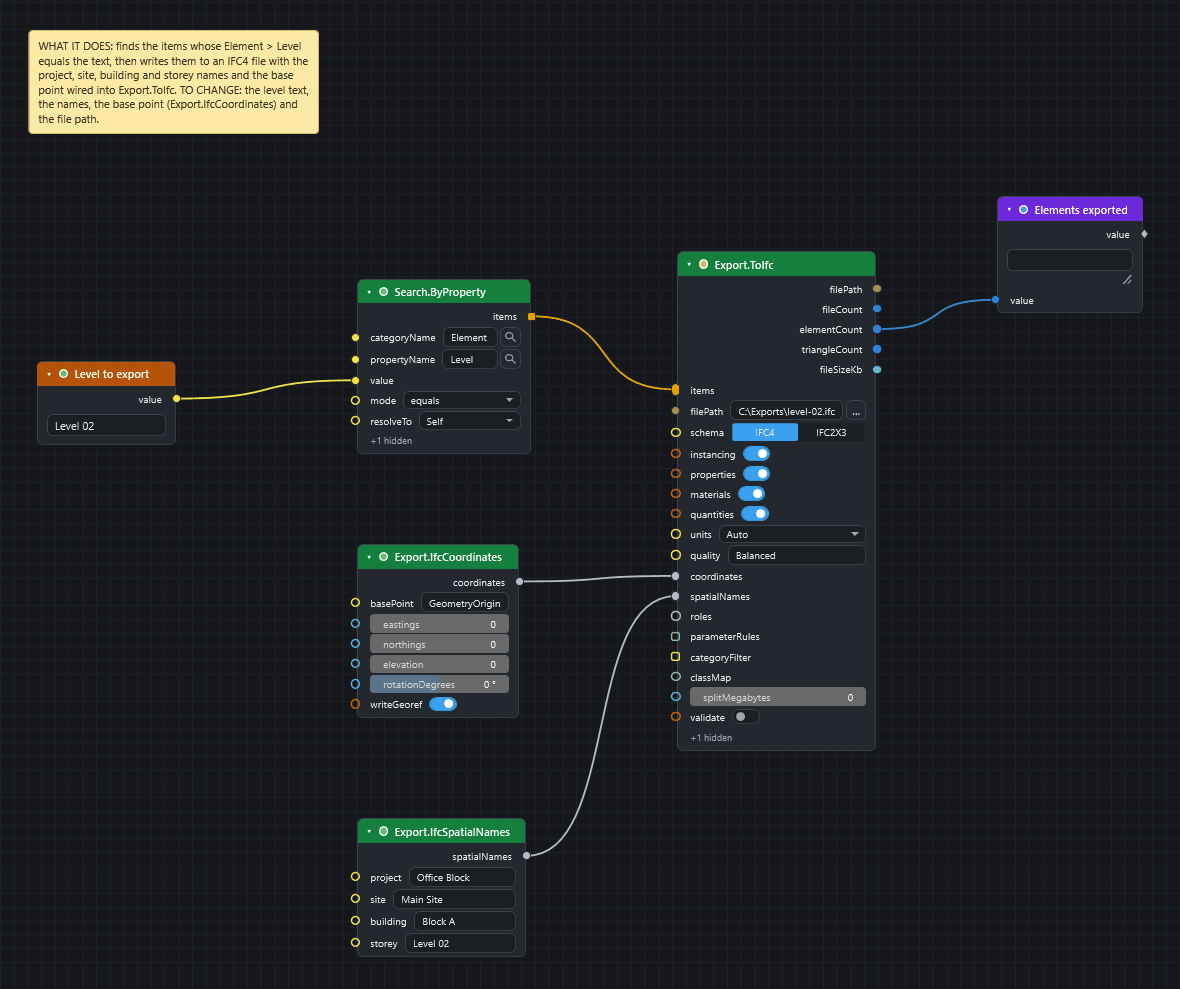
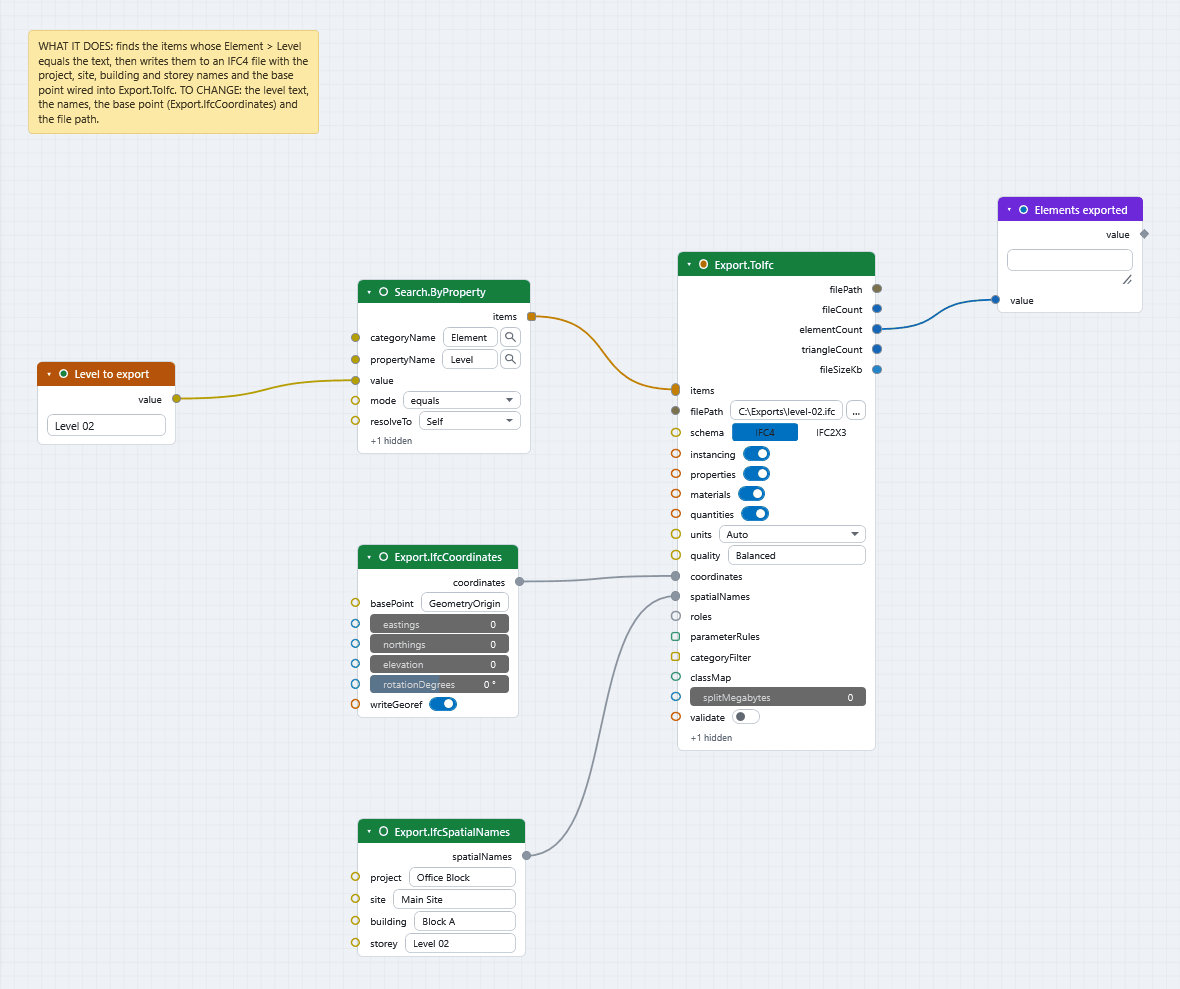
Stringnode (Input), rename itLevel to exportand typeLevel 02. AddSearch.ByProperty(Navisworks ▸ Search) to choose what to export:categoryName=Element,propertyName=Level,mode=equals, and wire theStringintovalue. Use a level name from your model. - Add
Export.ToIfc(Navisworks ▸ Export). Wire the searchitemsinto itsitems. Type the full path intofilePath. OnlyitemsandfilePathare required. - Add
Export.IfcSpatialNames(Navisworks ▸ Export). Type names intoproject,site,buildingandstorey, for exampleOffice Block,Main Site,Block AandLevel 02. Wire itsspatialNamesoutput into thespatialNamesinput ofExport.ToIfc. - Add
Export.IfcCoordinates(Navisworks ▸ Export). LeavebasePointonGeometryOriginfor now. Wire itscoordinatesoutput into thecoordinatesinput ofExport.ToIfc. - Add a
Watch(Display), rename itElements exportedand wireelementCountinto it. You can add more forfileCountandfileSizeKb. - Switch Auto off in the run bar, then press F5. The export reads the geometry of every item and can take a while on a large model.
What you get
An IFC file with a spatial tree, geometry (repeated shapes reused as mapped items to keep the file small), property sets, materials, base quantities and, for IFC4, georeferencing. The outputs filePath, fileCount, elementCount, triangleCount and fileSizeKb tell you what was written.
Useful options
| Input | Default | Use it to |
|---|---|---|
schema |
IFC4 |
Write IFC2x3 instead. |
instancing |
on | Switch off to write every mesh in full. |
properties, materials, quantities |
on | Leave out property sets, materials or base quantities. |
units |
Auto |
Force Millimeters, Centimeters, Meters, Feet or Inches if the model's units are wrong. |
quality |
Balanced |
Choose Small file or High detail. |
splitMegabytes |
0 | Split the output into parts near this size. 0 is one file. |
validate |
off | Run the built-in structural check on each file written. |
Export.IfcCoordinates also takes Custom for basePoint, with eastings, northings and elevation in metres, a rotationDegrees and a writeGeoref switch. Export.IfcSetClassMap gives items an IFC class by set name, and Export.IfcRoles and Export.IfcParameterRule map properties to IFC roles and rename them. All are described in IFC, BCF, Excel and CSV.
One file for each group
To write several IFC files from one graph, use one Export.ToIfc for each file, or put it between Loop.Item and Loop.Collect.
If it does not work
- The file is not written: see A file node fails with "access denied".
Export.ToIfcsays "No geometry elements to export": the search found no items, or none with geometry. See A search returns nothing.Export.ToIfcsays the path "must end in .ifc": fix the file name.- With
validateon, the node fails and lists the issues the checker found. - The export is slow: see Speed up a slow graph.
Next
- Send clashes to BCF.
- Export nodes lists every input and output.
- Privacy and safety: export nodes write files, so the Player asks before it runs a script that has one.